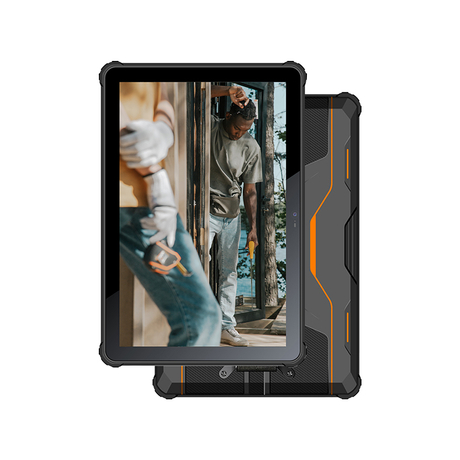
In hazardous industrial environments, device selection often focuses on certification, durability, and communication capability, but screen size also directly affects field productivity. For teams using an Industrial Intrinsically Safe 5G PAD, a 10.1-inch large screen can improve the speed and accuracy of inspections, maintenance tasks, barcode workflows, and field reporting. Industrial field work is rarely limited to a single tap or scan—technicians often need to read instructions, check asset information, confirm task steps, enter data, capture photos, and sync records in one workflow. A larger display makes these steps easier to manage in real conditions, especially when time, visibility, and accuracy matter. This article explains the practical advantages of a 10.1-inch screen in field operations and why it can be a strong productivity feature in an Industrial Intrinsically Safe 5G PAD.
1.Why Screen Size Matters in an Industrial Intrinsically Safe 5G PAD
An Industrial Intrinsically Safe 5G PAD is designed for hazardous-area field work where safety compliance must come first. But once the device is suitable for the site, usability becomes the next priority. A tablet’s screen affects how clearly users can read forms, review task details, verify scanned data, and document issues on-site.
Display Size Is Part of Workflow Performance
In industrial environments, workers may use the same device for inspection forms, work orders, asset checks, image capture, and communication. If the screen is too small, users may need to scroll more, zoom repeatedly, or switch screens frequently. That slows down the job and can increase mistakes.
A 10.1-inch screen provides more visible working space without moving to a laptop-sized device. It gives teams a practical balance between mobility and readable interfaces, which is especially useful in hazardous-area operations where work must be efficient and controlled.
A Larger Screen Supports the Value of Other Features
A large display becomes even more useful when combined with core features such as barcode scanning, 5G communication, an 8500mAh battery, and 8+256GB storage. These functions support fast field work, but the user still needs a clear interface to read results, confirm records, and complete multi-step tasks. In that sense, the screen is not just a display feature—it is a productivity multiplier.
2.Practical Advantages of a 10.1-inch Large Screen in Field Work
A 10.1-inch display delivers value not because it is simply bigger, but because it improves key task steps that happen repeatedly during industrial operations.
Better Readability for Forms, Checklists, and Technical Information
Field teams often work with long inspection forms, maintenance checklists, SOP steps, and equipment records. On smaller screens, users may need to scroll constantly or zoom in and out to read details clearly. This can slow task completion and increase input errors.
A 10.1-inch screen allows more content to be visible at once. Technicians can review instructions and input fields more comfortably, making it easier to follow procedures correctly and complete documentation with fewer interruptions.
More Efficient Data Entry in Multi-Step Tasks
Industrial workflows frequently involve multiple actions in sequence: opening a task, confirming equipment ID, entering measurements, adding comments, uploading a photo, and submitting status updates. When more fields and controls are visible at the same time, users can move through these steps faster.
This is especially useful for maintenance and inspection teams that complete repetitive digital forms throughout a shift. A larger screen helps reduce screen switching and supports more consistent data entry.
Stronger Support for Barcode-Based Workflows
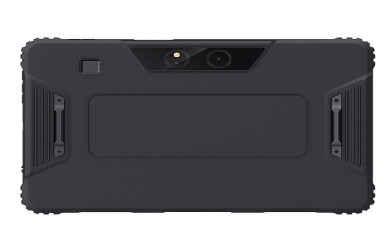
Barcode scanning is a key function in many Industrial Intrinsically Safe 5G PAD applications, including asset management, spare-parts verification, warehouse operations, and equipment labeling. Scanning is only one part of the process; users also need to confirm the scanned result and review the next action.
A 10.1-inch display makes scan-result verification easier by showing item details, status information, and task instructions more clearly. This helps reduce scan-confirmation errors in fast-paced environments where accuracy matters.
Better Photo Review and Issue Documentation
In field inspections and maintenance work, photo capture is often used for defect reporting, evidence documentation, and compliance records. A larger screen makes it easier to review photos immediately, check whether the image is clear enough, and add notes before submission.
This is useful when teams need to document equipment conditions, labels, leaks, damage, or installation details. The larger display improves on-site review and reduces the chance of incomplete or unclear documentation.
Easier On-Site Communication and Collaboration
A 10.1-inch screen is also easier to share visually during field discussions. Technicians can show task details, images, or diagrams to supervisors, coworkers, or inspectors without requiring everyone to crowd around a small handheld screen.
When combined with 5G communication, this also supports remote coordination. Teams can view instructions, upload records faster, and communicate more effectively with off-site support personnel.
3.Where a 10.1-inch Screen Adds the Most Value
The practical benefits of a larger screen are strongest in workflows that are visual, form-heavy, and multi-step.
Inspection and Maintenance Operations
Inspection and maintenance teams often need to read procedures, enter data, and capture evidence in a single session. A 10.1-inch screen helps them view checklists and task details clearly while recording results, comments, and photos without frequent navigation delays.
Warehouse and Asset Management Workflows
In warehouse and asset workflows, barcode scanning is often repeated many times per shift. A larger screen improves visibility of scanned item details, quantity checks, and verification steps, which supports faster and more accurate execution.
Utilities, Infrastructure, and Field Service
Utilities and field service teams may need to view diagrams, task tickets, meter data, or site records in outdoor or distributed environments. A 10.1-inch screen is more practical than a phone-sized display for mixed workflows that involve both visual review and data entry.
Safety and Compliance Documentation
EHS and compliance tasks often require clear form review, evidence capture, and corrective-action documentation. A larger display can improve usability during audits, internal inspections, and follow-up verification work, especially when multiple stakeholders need to review the same information on-site.
4.Trade-Offs to Consider Before Choosing a 10.1-inch Screen
A 10.1-inch screen offers clear productivity benefits, but it is not the best choice for every role.
Portability vs. Visibility
Compared with smaller handheld devices, a 10.1-inch tablet is less convenient for one-hand use and pocket carrying. However, for tasks that require repeated reading, verification, and data entry, the visibility advantage often outweighs the portability trade-off.
Accessories and Daily Carrying Methods Matter
To use a 10.1-inch device effectively during long shifts, buyers should also plan for accessories such as hand straps, shoulder straps, docks, or mounts. The right carrying and mounting setup can significantly improve comfort and productivity.
Workflow Fit Should Drive the Decision
If a role is mostly scan-only and short-duration, a smaller device may be enough. If the role involves forms, image review, and multi-step documentation, a 10.1-inch Industrial Intrinsically Safe 5G PAD usually delivers more practical value.
FAQ
Does a 10.1-inch intrinsically safe tablet improve form completion accuracy compared with smaller handheld devices?
In many workflows, yes. A larger screen can show more fields and instructions at once, which reduces scrolling and helps users review entries more clearly before submission. It also makes it easier to spot missing values, incorrect selections, or formatting mistakes before syncing records, which can improve data quality in inspection, maintenance, and compliance tasks.
Is a 10.1-inch screen better for viewing P&IDs, wiring diagrams, or maintenance drawings in the field?
Yes, in most cases it is more practical than a small handheld display. A larger screen improves readability and makes it easier to review technical visuals while entering notes or completing tasks. It can also reduce repeated zooming and panning, which helps technicians work faster and stay focused in time-sensitive field conditions.
How does screen size affect barcode scan verification speed in warehouse and asset workflows?
A larger screen can improve verification speed because scanned item details and next-step instructions are easier to read immediately after scanning, reducing confirmation delays and errors. This is especially useful in high-volume workflows where operators must scan, verify, and move quickly while still maintaining traceability and accuracy.
What carrying or mounting accessories are most important for daily use of a 10.1-inch industrial intrinsically safe 5G PAD?
Common high-value accessories include hand straps, shoulder straps, vehicle mounts, charging docks, and protective mounts. The best choice depends on whether teams are walking, climbing, driving, or working at fixed stations. In long-shift environments, the right accessories can reduce fatigue, improve handling safety, and make the device easier to use consistently throughout the day.
Conclusion
For many hazardous-area workflows, a 10.1-inch large screen is not just a comfort feature—it is a meaningful productivity advantage in daily operations. In an Industrial Intrinsically Safe 5G PAD, it improves readability, supports more accurate and efficient data entry, strengthens barcode verification workflows, and makes photo-based documentation easier to review, annotate, and manage on-site. When combined with barcode scanning, 5G communication, an 8500mAh battery, and an 8+256GB configuration, a 10.1-inch display can help field teams complete tasks faster, reduce avoidable errors, and maintain smoother workflow continuity during long shifts and repetitive inspections. The best device choice still depends on the actual job role, usage environment, and workflow design, but for visual, multi-step, and documentation-heavy field tasks, a 10.1-inch screen is often the more practical, efficient, and operator-friendly option.