Procuring an ATEX mobile device isn't just an IT hardware upgrade. It is a life-critical compliance decision carrying significant budget implications. Selecting the wrong device usually leads to one of two outcomes. You might face severe safety liabilities from using uncertified devices in volatile environments. Alternatively, you risk massive overspending by deploying expensive Zone 1 devices in standard Zone 2 areas.
This guide provides procurement teams, safety officers, and IT managers a structured, evidence-based evaluation framework. You will learn how to accurately evaluate field requirements before speaking to a vendor. We will help you shortlist and select hazardous area mobile devices properly. By following these steps, you maintain strict safety standards without sacrificing daily operational efficiency.
Key Takeaways
Match the Form Factor: An Intrinsically Safe Smartphone solves communication, but complex DCS integration requires an Intrinsically Safe Laptop And Tablet PC.
Don't Over-Spec: The cost gap between Zone 1/21 and Zone 2/22 devices is substantial; strict zoning verification prevents budget drain.
Understand the Architecture: Decide between Ex i (Intrinsically Safe, lighter but hardware-limited) and Ex d/enclosures (heavier but allows enterprise-grade processing).
Look Beyond the Label: Real-world adoption fails if devices lack gloved-touch sensitivity, reliable firmware updates, or robust Mobile Device Management (MDM) compatibility.
1. Mapping Form Factor to Operational Reality
Evaluate the actual field-use case before committing to a specific device category. You should avoid over-equipping frontline workers if simpler tools suffice. Giving every worker a high-end tablet wastes budget and creates physical fatigue. Instead, match the tool to the task.
The Core Communication Tool
An Intrinsically Safe Smartphone acts as the backbone for daily operations. It is best for core communication, executing digital checklists, and managing Lone Worker Protection (LWP). These phones suit mobile supervisors. They need agility to move across multiple zones while staying connected to the central control room. Modern models offer excellent voice clarity even in high-noise environments.
The High-Volume Scanner
Many warehouses require constant barcode scanning. Here, an Intrinsically Safe Handheld Terminal PDA becomes the absolute standard. It handles asset management and high-frequency data entry in hazardous zones. Buyers should look for built-in, dedicated scanner engines. Dedicated scanners vastly outperform camera-based scanning apps in speed and accuracy. They also drain less battery during intensive shift work.
The Heavy-Duty Workstation
Engineers often need to access complex schematics on site. Running full SCADA or DCS dashboards requires an Intrinsically Safe Laptop And Tablet PC. These devices offer large screens for extended remote diagnostics. However, buyers must consider mounting options and weight constraints. Carrying a heavy tablet for a 12-hour shift causes severe user fatigue without proper straps or vehicle mounts.
The Hands-Free Enabler
Sometimes workers cannot spare a hand to hold a device. Intrinsically Safe Wearable Devices are critical for hands-free operations. Common examples include smart glasses used for remote expert guidance. A technician can stream live video to an engineer hundreds of miles away. Other wearables include biometric monitors for confined space entry, ensuring operators remain conscious and safe.
2. Decoding Certification Tiers to Prevent Costly Over-Purchasing
The most common procurement mistake is buying universally rated Zone 1 devices for facilities requiring only Zone 2 compliance. Over-specifying drains enterprise budgets rapidly.
Zone 1/21 vs. Zone 2/22 Economics
Zone 1 devices command a steep premium. They often cost three to five times more than equivalent Zone 2 devices. You must always audit the facility’s Explosion Protection Document (EPD) first. The EPD documents the exact hazard zones. If a worker only operates in a Zone 2 area, a Zone 1 device offers zero extra legal protection. It only depletes your available budget.
Hazard Zone Level | Atmosphere State | Device Requirement | Budget Impact |
Zone 0 / 20 | Explosive atmosphere is present continuously or for long periods. | Highest protection (Category 1). | Extremely High Premium |
Zone 1 / 21 | Explosive atmosphere is likely to occur occasionally in normal operation. | High protection (Category 2). | High Premium (3x - 5x) |
Zone 2 / 22 | Explosive atmosphere is not likely to occur, or only for short periods. | Standard protection (Category 3). | Moderate Premium |
Understanding Equipment Protection Levels (EPLs)
You must assess the "Wood Barrel Effect" when reviewing EPLs. When you combine modular components, the overall system rating drops to the lowest-rated component. Imagine placing a highly rated Ga-rated tablet into a Gb-rated charging dock. The entire system legally becomes a Gb system. Procurement teams must audit every accessory, including headsets and scanners, to ensure matching EPLs.
Gas vs. Dust Groupings
Ensure the device matches the specific hazard present. Devices rated for common hydrocarbons usually carry a T4 temperature class (≤135°C). However, they may not be legally compliant for hydrogen or carbon disulfide environments. Those highly volatile chemicals require a stricter T6 rating (≤85°C). Checking the specific gas or dust group saves companies from critical audit failures.
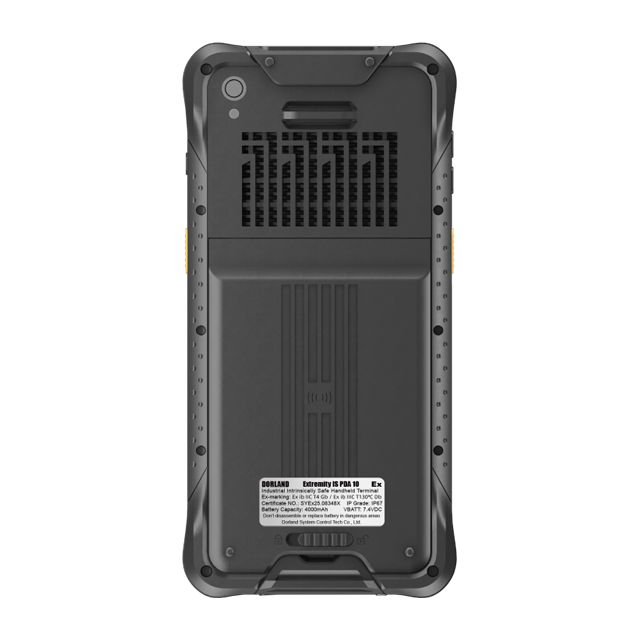
3. Evaluating Technical Architecture: Intrinsically Safe (Ex i) vs. Explosion Proof (Ex d)
Buyers must understand the underlying engineering philosophy. It directly impacts device performance, usability, and physical weight.
Ex i (Intrinsically Safe) Reality Check
The "Ex i" method limits electrical and thermal energy. Engineers design the mainboards to draw minimal power. Batteries usually restrict output to ≤2.5Wh per cell. This ensures the device physically cannot generate a spark hot enough to ignite ambient gas.
Pros: Devices remain thinner and lighter. They are often capable of Zone 0 or Zone 1 entry because they pose virtually no ignition threat.
Cons: They feature slower CPU clock speeds. They also have lower battery capacities. End-users cannot repair them; opening the case voids the ATEX certification entirely.
Ex d / Enclosure Approaches
The "Ex d" method takes a different path. It relies on heavy, durable casings. If an internal component sparks and ignites a tiny amount of gas inside the device, the casing contains the explosion. It prevents external propagation into the broader facility.
Pros: This architecture allows manufacturers to use standard, high-performance consumer internals. You get modern processors and 5G capabilities at a lower initial hardware cost.
Cons: These devices are significantly heavier. Tablets often exceed 1kg. They feature bulkier ergonomics and are typically restricted to Zone 2 environments.
Feature | Ex i (Intrinsically Safe) | Ex d (Explosion Proof) |
Core Mechanism | Prevents sparks from occurring | Contains internal explosions |
Processing Power | Usually 1-2 generations behind | Modern flagship performance |
Weight & Ergonomics | Lightweight, pocketable | Heavy, bulky casings |
Common Zones | Zone 0, Zone 1 | Zone 2 (mostly) |
4. Real-World Usability: Friction Points Buyers Often Miss
Spec sheets do not reflect the realities of industrial adoption. You must validate experiential factors during physical pilot testing. A device looks great on paper but can fail miserably during a night shift in winter.
Environmental Resilience Beyond ATEX
Do not confuse ruggedness with Ex-compliance. A device must possess both traits. A compliant device still breaks if dropped on concrete unless it carries proper rugged ratings. Verify a minimum IP65 rating for standard dust and water protection. Idealy, look for IP68 if your chemical plant requires high-pressure washdowns. Demand concrete drop-test reports from the vendor.
PPE Compatibility
Standard capacitive touchscreens become useless under heavy industrial gloves. Workers will not remove their safety gloves to type a message. Test the device for dedicated physical buttons. Essential functions like Push-to-Talk (PTT) and SOS must have tactile, physical triggers. Evaluate the digitizer tuning. Modern screens should feature specific "glove mode" or "wet-tracking" settings for seamless use in rain.
Battery Behavior in Extreme Temperatures
Cold environments (-20°C) cause severe battery voltage drops. A phone lasting 15 hours in a lab might die after 4 hours outdoors in winter. Request vendor data on real-world shift lengths. Your target should be 12+ hours under temperature stress. Do not accept standard lab benchmarks. If possible, test the battery decline rate yourself during a winter pilot.
Advanced Safety Features
Verify the reliability of integrated safety protocols. Lone Worker Protection (LWP) is non-negotiable for remote workers. Test the gyroscope-based "man-down" alerts. If a worker falls and remains motionless, the device must alert the control room automatically. Dead-man switches also provide active verification that the operator remains conscious.
5. Vendor Vetting and Lifecycle Management
Hardware is only half the purchase. Enterprise deployment requires robust backend support and software longevity. Without strong software ecosystems, your hardware becomes obsolete prematurely.
Firmware and Security Updates
A known industry pain point is the 6–12 month delay in Android or iOS updates for certified devices. Recertification red tape causes these delays. Every time the operating system changes drastically, the device might need new compliance checks. Demand transparent Service Level Agreements (SLAs) regarding security patching. Ask the vendor exactly how fast they deploy critical Android security patches.
MDM Compatibility
Ensure the OS integrates seamlessly with your existing infrastructure. Mobile Device Management (MDM) platforms like SOTI or Microsoft Intune are vital. They allow IT teams to deploy apps remotely and lock down lost devices. Zero-touch provisioning saves hundreds of IT hours during initial rollout. Test MDM enrollment during the pilot phase.
Lead Times and Supply Chain
Global certification standards impact inventory heavily. Specialized batteries or Ex-certified displays face supply chain bottlenecks. Ask suppliers for realistic 2025/2026 delivery lead times before committing to large rollouts. A promised price means nothing if the hardware takes eight months to arrive.
Reverse-Interview Questions for Suppliers
Take control of the sales conversation. Ask suppliers the following hard questions:
"Can you provide the Declaration of Conformity (DoC) and the third-party certification reports?"
"What is the guaranteed end-of-life (EOL) support window for this specific chassis?"
"If a device breaks, what is the exact turnaround time for certified repair facilities in our region?"
"Will a future OS upgrade require physical recertification of the hardware?"
Conclusion
Base your initial shortlists strictly on compliance zones defined in your EPD documentation. Narrow the field by selecting the appropriate form factor. Handhelds handle warehouse scanning, while tablets manage complex dashboards. Make your final decision based on MDM integration and real-world pilot tests under full PPE.
Your next step should be initiating a 30-day proof-of-concept (POC). Select two competing vendors. Measure field worker adoption rates, tactile button usability, and battery performance under actual plant conditions. A hands-on trial exposes flaws that brochures hide, ensuring your final selection keeps your workforce safe and productive.
FAQ
Q: Can I put a standard consumer smartphone in an explosion-proof case?
A: No, unless the entire system (device plus case) has been certified as a single unit by an ATEX/IECEx notified body. Using unauthorized cases voids compliance and introduces severe safety risks.
Q: What is the difference between "Rugged" and "Intrinsically Safe"?
A: "Rugged" refers to physical durability, such as waterproof or drop-proof capabilities. "Intrinsically Safe" refers to the inability to generate sparks or thermal energy sufficient to ignite an explosive atmosphere. A rugged phone is not legally permitted in a hazardous area unless it carries explicit Ex certification.
Q: Do ATEX mobile devices run standard Android or iOS?
A: Yes, most run standard Android or modified iOS. However, because hardware components like batteries and CPUs must be locked down for certification, they are often one or two generations behind consumer flagship models in terms of raw processing power.